




The release in brief
An AI platform for life sciences has to do more than produce a plausible paragraph. It has to help teams keep track of the document, the source material, the template, the review decisions, and the people permitted to change each of them. That is the thread running through AuroraPrime RMA 2026.07.26.
This article is for regulatory, medical-writing, clinical, CMC, and content-governance teams evaluating how an AI authoring workflow holds together after generation. It covers the release changes that affect document control, reusable content, and review. It does not make a compliance determination for any organization; teams should assess their own processes, configurations, and applicable requirements.
Key takeaways
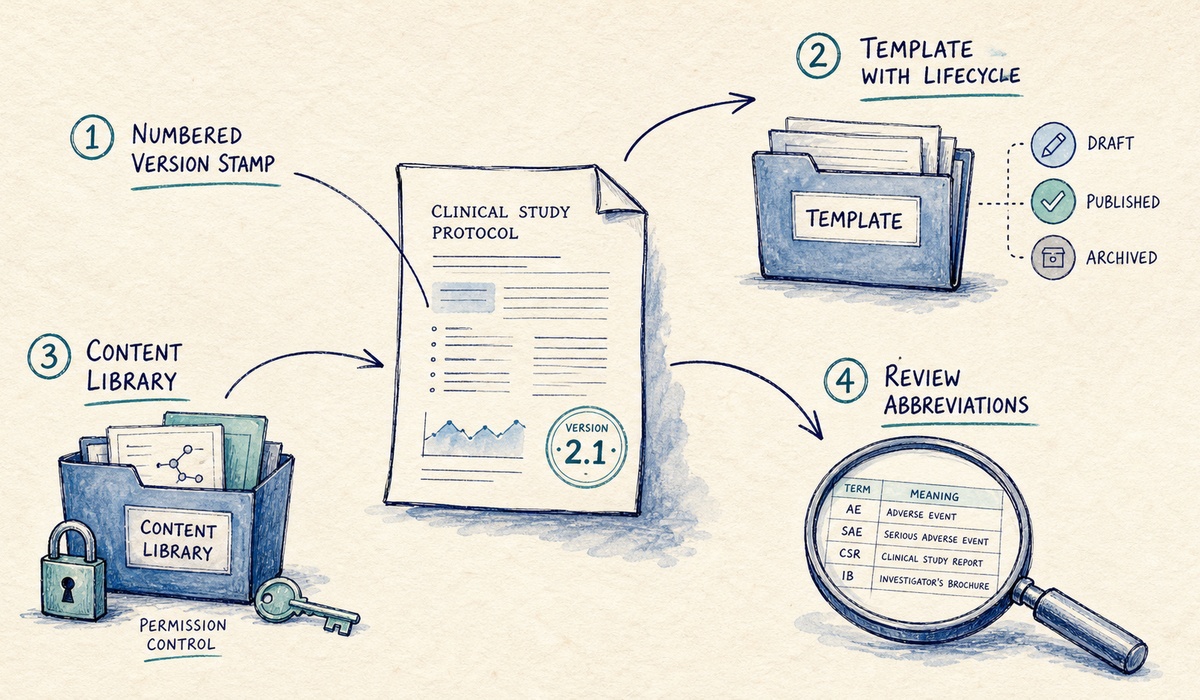
The 2026.07.26 release adds manual portal saving for supported RMA Add-in document types, creating a stored version that is available for portal-based work when Word is closed.
Project templates now move through three working states: Draft, Published, and Archived. Only Published templates can be used to create new projects.
Content Library permissions can be managed at one of three levels: top-level folders, any folder, or individual content units.
The abbreviation workflow brings two recognition methods, section-based scoping, conflict review, and occurrence thresholds into a single operating flow.
Why the work after drafting matters
The first useful draft is a milestone, not a finish line. A regulatory document may move through a template, a working version, a source update, a review cycle, and a controlled content library before it reaches its final destination. If those handoffs live in separate places, writers lose time reconstructing context and reviewers lose confidence in what they are looking at.
That concern is not unique to AI. FDA guidance explains that electronic records subject to applicable requirements may be created, modified, maintained, archived, retrieved, or transmitted electronically. ICH E6(R3) likewise treats data governance, relevant metadata, review, retention, and access as linked parts of the clinical-trial record lifecycle. An AI authoring platform does not replace an organization's governance model, but it should make that model easier to operate.
The 2026.07.26 release concentrates on four points where that operating model often gets thin: document versions, template use, reusable content, and reviewable terminology.
1. Make the document available beyond the desktop
With this release, writers can manually save documents from the RMA Add-in to the RMA Portal across supported document types. Each save creates a version in the project workspace. The Document Information panel shows the current version, organization, writing project, portal path, and latest portal-save information.
That changes a small but consequential part of the workflow. A document can be worked on in Word, then made available in the portal for the tasks that need a shared workspace. The release notes are clear about one boundary: automatic saving is not part of this version. Teams decide when to create the portal version by saving manually.
For a pharma AI authoring platform, that is a more useful control than a vague promise of "continuous sync." It gives writers a deliberate handoff point. It also gives reviewers a more stable object to discuss, rather than an unknowable copy that may still be changing locally.
2. Treat templates as governed starting points
Templates do not stay static for long. A working template can be under development, ready for new work, or retired while still supporting active projects. RMA now gives project templates a lifecycle that maps to those real conditions: Draft, Published, and Archived.
| Template state | What it means for a writing team |
|---|---|
| Draft | The template is being prepared and is not available for new projects. |
| Published | The template can be selected when writers create a new project. |
| Archived | The template is retired for new projects but remains linked to projects already using it. |
The distinction matters because it separates template maintenance from project continuity. A team can stop offering an outdated starting point without breaking the relationship between an existing project and the template it began with. That is a sensible pattern for regulated writing, where projects rarely all move at the same pace.
3. Put reusable content under proportionate control
The Content Library updates in 2026.07.26 address a deceptively hard question: how precise should content permissions be? The answer should depend on the way a team organizes content, not on a fixed product assumption.
RMA Portal administrators can choose one of three permission granularities: top-level folders only, any folder, or individual content units. A centralized library may be well served by folder-level access. A library with high-value, narrowly governed content may need item-level control. The release gives teams a way to choose that trade-off explicitly.
That choice has a broader governance context. ICH E6(R3) materials identify user management as a consideration for computerized systems in clinical research.
The same release also adds conditional content variants, periodic acknowledgement support, Word-based editing through the change-control workflow, and bulk insertion of Content Library items into templates. Taken together, these features support a more disciplined reuse model: store approved material, scope access appropriately, review it on a schedule when needed, and place it into a template without rebuilding the same structure by hand.
4. Make terminology review part of the authoring flow
Abbreviation lists can look minor until a definition conflicts, a section should be excluded from a count, or a writer needs to decide whether a term belongs in the shared library. The updated RMA workflow puts those decisions in one place.
Writers can identify abbreviations through an online abbreviation list or an AI scan, then review the full term and occurrence count. The Section filter lets users scope the calculation; abbreviations in TFLs and headings are excluded automatically. When multiple definitions are found, the in-text abbreviation table supplies the default definition where available, and the writer can select or enter the appropriate term.
The operational detail is worth calling out. Teams with Content Admin permissions can save approved terms to the organization library, while occurrence thresholds can be set for table updates and normalization. The tool still needs judgment, especially when a document contains overlapping terminology or an unusual writing convention. But it gives that judgment a defined place to happen.
A practical review checklist for the July release
Before enabling or expanding these capabilities, a cross-functional team can use this short checklist:
Set the portal-save expectation. Decide when writers should create a portal version and who reviews the saved version.
Define the template owner. Identify who can publish or archive a project template and how active projects will be handled.
Choose permission granularity deliberately. Start with the least detailed level that supports the organization's access model, then move to folder or item-level control only where it earns its administrative cost.
Agree on library admission. Specify who may add a new abbreviation or Content Library item, and what review is required first.
Pilot a real document. Use a representative document with existing terminology and source material; review the output, the version record, and the permissions before scaling the workflow.
This is not a generic "adopt AI" list. Each step maps to a change in the 2026.07.26 release. The point is to turn new controls into a team habit rather than leave them as toggles in a configuration screen.
Frequently asked questions
Does the release automatically save RMA Add-in documents to the portal?
No. In 2026.07.26, writers manually save supported add-in documents to create a portal version. Automatic saving is not included in this release.
Which project templates can writers use for new projects?
Only Published project templates can be used to create new projects. Draft templates are still being prepared, and Archived templates cannot be used for new projects but remain associated with existing projects.
Can Content Library permissions be set below the top-folder level?
Yes. Administrators can manage Content Library permissions at top-level folders only, at any folder, or for individual content units.
How does the updated abbreviation workflow handle conflicting definitions?
RMA flags conflicting definitions for review. When an in-text abbreviation table provides a definition, it is the default; writers can then select or enter the correct full term. Users with Content Admin permissions can save approved terms to the organization library.
The release is about controlled momentum
The strongest AI writing workflows do not stop at generation. They retain the context that lets a team trust and reuse what was generated: a known version, a purposeful template state, an intentional access boundary, and a review path for the terms that matter.
AuroraPrime RMA 2026.07.26 gives teams more of those working controls. If your regulatory or medical-writing group is evaluating an AI platform for life sciences, start by mapping the release changes to one active document workflow. The useful question is not "Can it draft?" It is "Can our team govern what happens next?"
To discuss an AuroraPrime RMA workflow for your team, contact AlphaLife Sciences.
