




Transforming CMC Automation: AI-Powered Quality Documentation
Mar 05, 2026Discover how CMC automation using AuroraPrime RMA streamlines the creation of CTD Module 3 Quality Documentation and CTD Module 2.3 Quality Overall Summary (QOS).
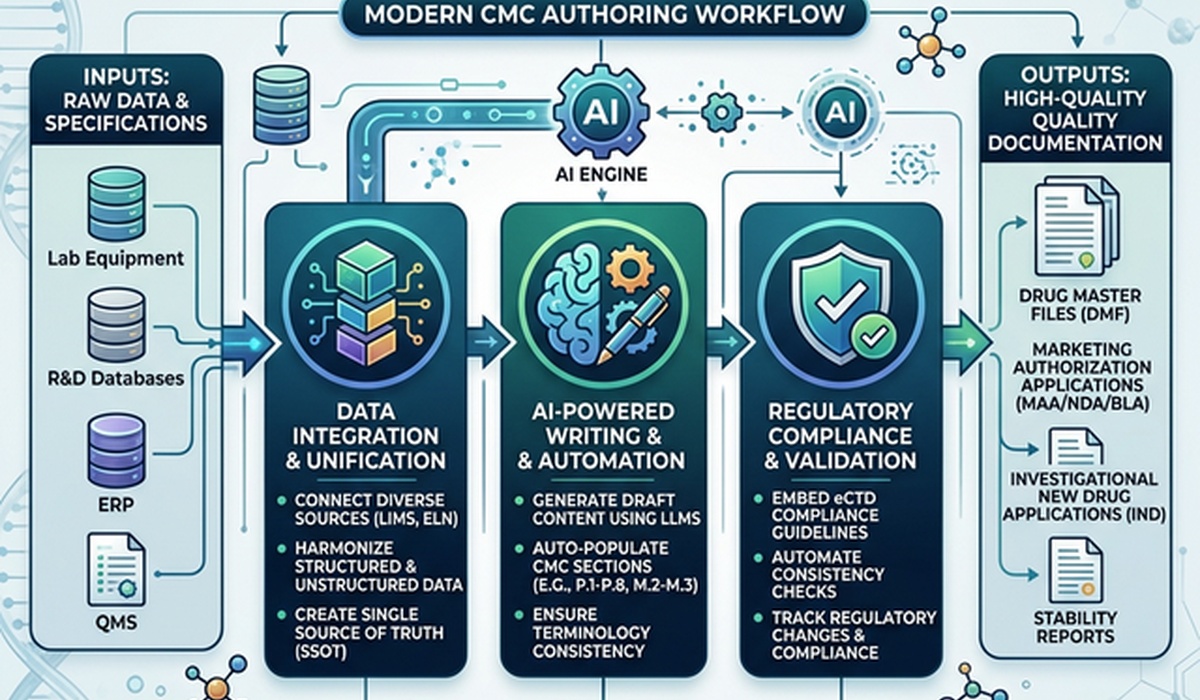
The process of moving a drug from development to commercialization requires massive amounts of paperwork, with Chemistry, Manufacturing, and Controls (CMC) documentation at the center.
Who this is for: Regulatory affairs directors, CMC leads, and clinical manufacturing coordinators who want to speed up submission drafting. We'll look at the practical hurdles of writing CTD Module 3 Quality Documentation and CTD Module 2.3 Quality Overall Summary (QOS), and show how automation tools actually help. (We aren't covering LIMS architectures or server setups here).
Key Takeaways
Faster drafts: Automating initial drafting cuts down the time spent on CTD Module 3 and 2.3 by up to 75%.
No more copy-pasting: Linking source tables directly to documents stops transcription errors.
Template control: You can lock down styles and formats to meet regulatory requirements without constant manual formatting checks.
Drafting CTD Module 3 Quality Documentation normally involves heavy manual work. Writers pull analytical data, check batch records, and verify that specifications line up across thousands of pages. In practice, regulatory teams often spend up to 40% of their submission prep time just formatting documents and checking data instead of actually analyzing the science.
We built AuroraPrime RMA to fix this. Here is how automating your writing workflow changes the way your team handles the CTD Module 2.3 Quality Overall Summary (QOS) and Module 3 deliverables.
Why CMC writing is so painful
Unlike clinical data, which usually follows neat CDISC formats, CMC data lives everywhere. You have to pull information from LIMS, ERPs, batch records, and messy R&D reports.
When putting together a CTD Module 2.3 Quality Overall Summary (QOS) or the underlying CTD Module 3 Quality Documentation, writers deal with three major headaches:
Scattered data: Manually typing analytical limits, stability data, and process parameters into Word.
Broken traceability: If a specification changes in Module 3, you have to remember to update it in the Module 2.3 summary.
Endless reviews: Running multiple review cycles just to check if excipient names and testing methods are consistent across the dossier.
These manual steps add 15 to 20 days to a major submission cycle. They also pull skilled scientists away from their actual jobs to do data entry.
How AuroraPrime RMA automates the process
We designed AuroraPrime RMA to handle the busywork. It runs inside Microsoft Word 365, giving writers tools to automate drafting and cross-referencing.
Manual vs. Automated Workflow
| Capability | Old Approach | AuroraPrime RMA |
|---|---|---|
| Drafting | Hundreds of hours spent manually copying data | Automated synthesis that builds first drafts up to 75% faster |
| Updates | Hunting down every reference when source data changes | Source data changes sync automatically to the document |
| Traceability | High risk of mismatches between Module 3 and Module 2.3 | Bi-directional links connect summaries directly to source tables |
| Review Cycles | 3-4 rounds just for formatting | Formatting is locked in, so reviewers focus on the science |
Getting data out of source files
The hardest part of writing CMC documents is accurately extracting data into your template. In AuroraPrime, you start with a CTD Module 3 Quality Documentation template.
Link your source files—like stability tables or method validation reports—and the system extracts what you need. Whether you want a verbatim copy of a testing procedure or a short summary of a manufacturing process, generating it automatically takes a fraction of the time.
Structuring the CTD Module 2.3 QOS
The CTD Module 2.3 Quality Overall Summary (QOS) just synthesizes the massive amount of data already sitting in Module 3. Manually summarizing it is redundant.
With AuroraPrime RMA, you set the QOS template to pull directly from your completed Module 3 sections. You can give the system specific instructions (e.g., "Summarize the key stability findings and proposed shelf-life in under 200 words"). The result is a concise summary that stays linked to the Module 3 data. If the underlying data changes later, the summary updates too.
Handling heavy tables
CMC dossiers have a lot of tables—formulations, impurities, stability data. You can batch-import source tables into AuroraPrime RMA. If a table is too wide and needs to be split for readability, you can adjust it in the Edit View without breaking the link to the original data. When the source updates, Content Sync pushes the new numbers to your document while keeping your captions and narrative intact.
Frequently Asked Questions
What is CTD Module 3 Quality Documentation?
It's the part of the Common Technical Document that covers chemistry, manufacturing, and controls (CMC) for the drug substance and the final drug product. It usually contains over 300 subsections.
How do you prevent AI hallucinations with CMC data?
AuroraPrime RMA links the generated text directly to your approved source documents. You always review the generated text side-by-side with the original data. It handles the transcription, but you keep total oversight.
Does it work with our company's templates?
Yes. You can upload your own document templates and configure the generation rules to match your standard operating procedures.
The bottom line
Moving to CMC automation saves time, but more importantly, it stops transcription errors and keeps your data consistent. Using AuroraPrime RMA, you can turn the manual slog of drafting CTD Module 3 Quality Documentation and the CTD Module 2.3 Quality Overall Summary (QOS) into an efficient workflow.
Give your CMC teams their time back. Let them focus on strategy instead of formatting.
